
A security patrol checkpoint system works by tracking, verifying, and recording all the patrol activities performed by a security guard in real-time for accountability purposes. The good thing is that many security firms realised the benefits of using it and have adopted it wholeheartedly, but some did not. Are you one of them?
We are asking this because not adopting it is counterproductive. Let’s understand this through an example.
One security firm was handling the security of multiple sites, which included warehouses, offices, and retail units. Guards were doing their job of patrols, signing paper logs, and reporting incidents verbally. Things looked normal until it was revealed that there was no proper record of proving that the patrols were taking place properly.
The issue is not guards are not doing their job or there is a scarcity of guards, but the lack of visibility and accountability to their clients.
Once they implemented the security patrol checkpoint system, the company gained:
- Real-time tracking of patrols
- Digital proof of completed checkpoints
- Instant alerts for missed rounds
In 2026, the question that will be asked by your clients is not:
Are your guards doing their rounds?
It’s:
Can you prove they did?
Security patrol checkpoint systems will answer this question effectively.
What is a Security Patrol Checkpoint System?
A security patrol checkpoint system is a digital solution used for ensuring that the guards have completed their patrols on the scheduled route.
In simple terms:
- Guards will follow a predefined route
- They will scan checkpoints using a device (QR code, NFC tag, RFID or Virtual Checkpoints)
- The system logs time, location, and activity
This system creates a digital audit trail for each patrol conducted, thus creating and maintaining accountability in front of your clients.
Why is a Security Patrol Checkpoint System Important?
Before the security patrol checkpoint system, security firms used to rely on:
- Verbal updates
- Manual logs
- Memory
These methods can be manipulated easily, making it hard for clients to trust them, making the security patrol checkpoint system highly important.
But what makes them important?
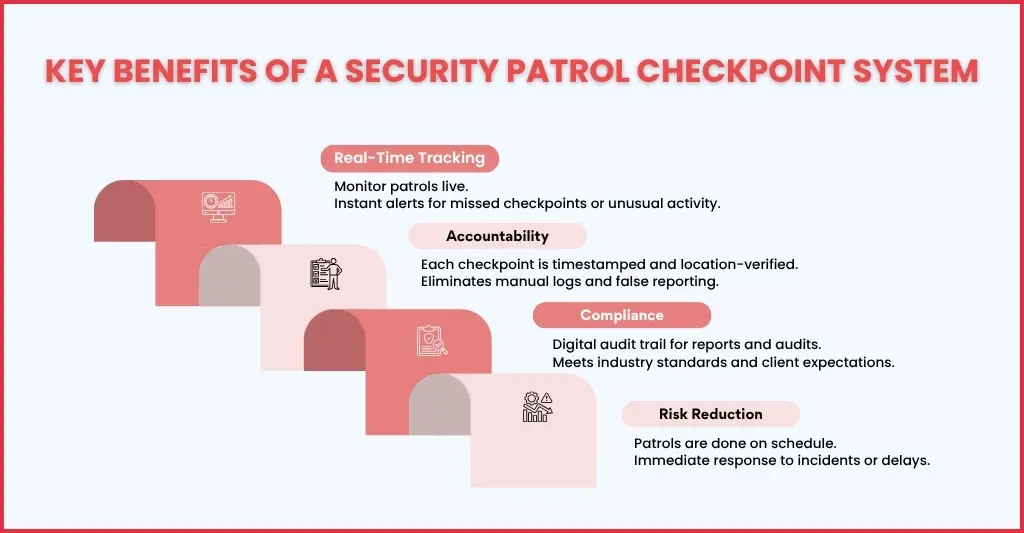
Accountability
In traditional patrol setups, it is difficult to know whether guards are completing their patrol by visiting every checkpoint or not. Paper logs were filled later, and verbal confirmations are hard to believe.
A checkpoint system will ensure:
- Your guards scan each checkpoint in real time
- Every action is timestamped and location-verified
- Supervisors can review completed patrols instantly
Real-Time Monitoring
One of the biggest limitations of manual patrol systems is the lack of visibility in real-time. Supervisors will know about the incidents only after the patrol shift ends.
When a digital system is used:
- Patrol progress can be tracked live
- Missed checkpoints trigger instant alerts
- Delays or unusual activity can be flagged immediately
Compliance
These days, security firms are increasingly required to meet their client expectations and industry standards set by the British Security Industry Association.
These compliance requirements are:
- Providing accurate reports
- Maintaining consistent records
- Proving service delivery
Unfortunately, manual systems fall short when it comes to fulfilling these requirements.
A security patrol checkpoint system ensures:
- Digital audit trails for every patrol
- Consistent reporting formats
- Easy access to historical data
Risk Reduction
Security risks go up when guards miss out on patrols or delay in responding to incidents, and without a system in place, all goes unnoticed.
With a checkpoint system:
- Patrols are completed as scheduled
- Issues are reported instantly
- Supervisors can intervene when needed
Key Components of a Security Patrol Checkpoint System
The security patrol checkpoint system is a combination of hardware, software, and processes that work together to create visibility and control over patrol operations.
Let’s break this down in a practical way
Checkpoints
Checkpoints are the foundation of the entire system. These are physical markers (QR codes, NFC tags, or RFID tags) installed at key locations, like entrances, exits, and high-risk zones, across the site (office premises or industrial unit).
What they do:
- Define the patrol route
- Ensure guards physically visit specific locations
- Create a structured path instead of random patrols
Mobile Device or Scanner
These devices are used by guards to interact with the system during patrols. It includes:
- Smartphones with an app or a dedicated scanning device
- They are used for scanning QR codes, tapping NFC tags, or reading RFID signals
- Once scanned, data is captured instantly at each checkpoint
What gets recorded:
- Exact time of the scan
- Location of the checkpoint
- Identity of the guard
Software Platform
The software is the centre of the system through which live patrol activities are displayed, and patrol data is collected and stored.
Using the software your supervisors can:
- Track patrol progress in real time
- Review completed routes
- Generate reports for clients and audits
Cloud Storage
All patrol data is stored securely in the cloud. This ensures:
- Accessible anytime from any location
- Eliminates the need for physical records
- Ensures data is backed up and protected
Why it matters:
- It gives easy access for audits and client reporting
- Long-term storage of patrol history
- Improved data security
Alerts & Notifications
Here’s where the system becomes proactive and keeps your guards and supervisors alert.
- These alerts are triggered for missed checkpoints
- Notifications will be sent for delays or unusual activity
- Instant updates sent to supervisors
This will ensure:
- Immediate response to issues
- Prevention of security gaps
- Better coordination between teams
How Does a Security Patrol Checkpoint System Work? (Step-by-Step Process)
Security patrol checkpoint systems have turned routine patrols into a structured, trackable, and verifiable process. With all data captured now in real-time, reliance on manual logs or assumptions has reduced considerably.
Let’s walk through how it actually works on the ground
Step 1: Set Up Patrol Routes
Start mapping out the office or industrial site which you will guard to identify.
- Key locations such as entry points, exits, and high-risk areas
- Install QR codes, NFC tags, or RFID checkpoints at these locations
- Decide patrol routes based on risk levels and site requirements
- Then assign guards for the specific routes and schedule
Why it matters:
This step ensures patrols are structured, not random, and every guard knows where to go and what to check.
Step 2: Guard Starts Patrol
After the installation of the checkpoints, the patrol begins. Ensure your guards are:
- Logged into the system using a mobile app or scanning device
- Their identity is verified
- The assigned patrol route becomes visible
What this does:
- Each of your guards will be linked to a patrol
- Ensures accountability from the very start
Step 3: Checkpoint Scanning
When your guard moves across the site, they will scan each checkpoint using their device.
The system instantly records:
- Exact time of the scan
- Location of the checkpoint
- Guard ID
This step confirms that:
- The guard physically visited the location
- Eliminates the possibility of backfilling or false reporting
- Creates a tamper-proof record of patrol activity
This step transforms patrols into verifiable actions, not assumptions.
Step 4: Real-Time Monitoring
When the patrol is in progress:
- Your supervisors can view progress through a central dashboard
- All completed and pending checkpoints will be visible instantly
Alerts will be triggered if:
- A checkpoint is missed
- A patrol is delayed
- Unusual activity occurs
What this enables:
- Backup if something goes wrong
- Better coordination between teams
- Improved operational control
Step 5: Incident Reporting
Securing a site doesn’t mean just checking locations; it’s about identifying risks.
During patrols, your guards will be able to:
- Report issues such as broken locks, open doors, or suspicious activity
- Add notes, photos, or comments directly within the system
- Link incidents to specific checkpoints
This step ensures:
- All incidents in the premises are documented instantly
- It provides context for incidents
- Improves communication between guards and management
Step 6: Report Generation
Once the patrol is completed, the system will generate detailed reports automatically.
These reports contain:
- Patrol routes completed
- Timestamps for each checkpoint
- Incidents logged
- Missed or delayed checkpoints
These reports provide:
- Clear evidence for clients
- Supports compliance and audits
- Simplifies performance evaluation
Types of Security Patrol Checkpoint Systems
The security patrol checkpoint systems are made of multiple components, among them the major one is the checkpoints. These checkpoints are the foundation of the system and are available in multiple types, which are:
QR Code-Based Systems
It is a low-cost and easy-to-deploy system and requires a smartphone with an app for scanning, making it ideal for indoor locations like office premises.
RFID-Based Systems
Such systems use tags and require dedicated scanners. It is much more durable and can resist harsher environments, making it ideal for installation in industrial units.
NFC-Based Systems
Under this system, the NFC checkpoints will be installed at key locations. When a guard is passing the checkpoint in close proximity, their presence is registered quickly without the need for physical scanning using a smartphone or special device.
GPS-Based Tracking
This type of system allows your supervisors to track your guards continuously, making it ideal for installation at large outdoor locations.
Key Features to Look for in a Security Patrol Checkpoint System
Have you already started looking for a security patrol checkpoint system? Before you do that, you must know certain essential features to look for in it. These features are:
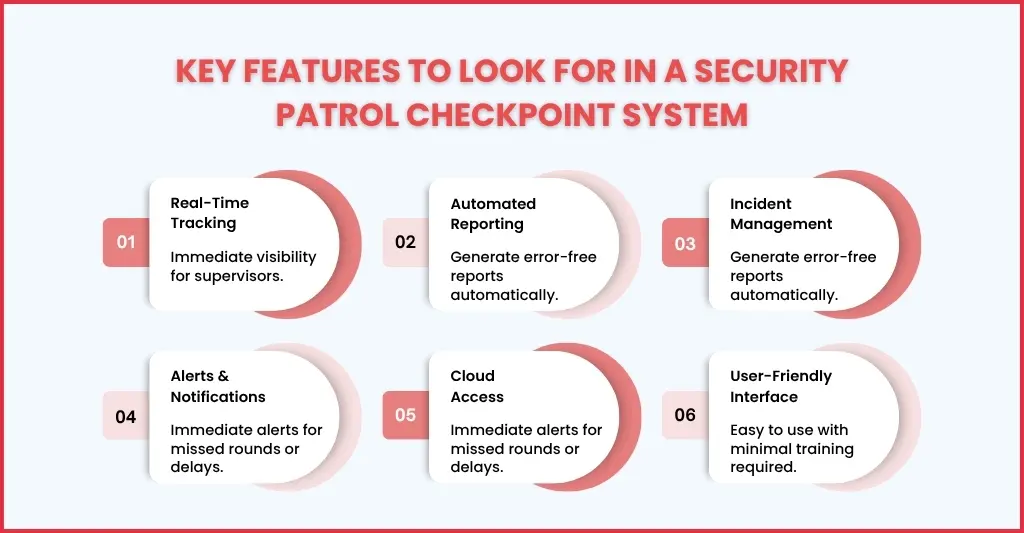
Real-Time Tracking: For monitoring patrols live and providing your supervisors with immediate visibility
Automated Reporting: It allows the generation of reports quickly without manual paperwork, reducing the chances of errors or manipulation.
Incident Management: Allows logging of incidents in real-time with options to attach photos and notes. It allows superiors to send backup immediately.
Alerts & Notifications: Whenever your guard misses or skips a patrol checkpoint or if the patrols are not done within a scheduled time, an alert will be sent to the supervisor.
Cloud Access: All the data related to patrols and incidents will be stored securely, which can be accessed from anywhere.
User-Friendly Interface: Find a system that is easy for your guards to understand and operate, and requires minimal training.
Basically, select a system that balances simplicity with functionality like QR Patrol.
Industries That Use Security Patrol Checkpoint Systems
Some of the industries that will benefit from security patrol checkpoint systems are:
- Commercial establishments like office premises and malls
- Warehouses that need inventory security and access control
- Hospitals ensure patient safety and enforce access control in restricted areas like X-ray rooms and operating theatres.
- Construction sites require protecting construction equipment and maintaining continuous monitoring
- Residential gated complexes for security
Common Challenges and How the System Solves Them
While conducting patrols, your guards often come across multiple challenges, and the security patrol checkpoints systems have been designed to overcome them. Let’s see how they overcome some of the common challenges.
Challenge 1: Missed Patrols
This challenge was addressed by the system by sending real-time alerts to superiors when patrols are missed and by maintaining checkpoint tracking through GPS.
Challenge 2: Lack of Proof
The system keeps a record of each scan, entry and exit, and incidents taking place in a cloud storage with timestamps and location data, ensuring transparency.
Challenge 3: Manual Errors
There is no scope for manual errors when this system is used due to automated scanning and reporting.
Challenge 4: Poor Communication
Through a centralised dashboard and instant updates, your supervisors can maintain constant communication with your guards.
Challenge 5: Compliance Issues
All reports will be in an easy-to-understand as per standard format with digital proofs.
This is where QR Patrol makes a difference.
QR Patrol provides:
- Real-time patrol tracking
- Easy checkpoint scanning (QR/NFC)
- Instant incident reporting
- Automated reports for clients
- Cloud-based access
For security firms, this means:
- No missed checkpoints
- No manual logs
- Complete transparency
FAQs
What is a Security Patrol Checkpoint System?
It is a digital system that tracks and records security patrol activities using checkpoints and scanning devices.
How does a patrol checkpoint system improve security?
It ensures accountability, provides real-time tracking, and reduces the risk of missed patrols or incidents.
Is a checkpoint system difficult to implement?
No. Modern systems like QR Patrol are easy to set up and require minimal training.
Can it work for multiple sites?
Yes. Cloud-based systems allow monitoring of multiple locations from a single dashboard.
Does it replace security guards?
No. It enhances their performance by providing tools for better tracking and reporting.
Conclusion
A security patrol checkpoint system cannot be dismissed as an option; it’s an essential tool for modern security operations.
Without it:
- Patrols will lack accountability
- Errors will go unnoticed
- Compliance will become difficult
Using such systems will ensure:
- Every patrol is tracked
- Every checkpoint is verified
- Every report is accurate
With solutions like QR Patrol, security firms can now:
- Improve their efficiency
- Reduce risks
- And deliver better service to clients
Ready to upgrade your building’s security and streamline your guard operations? Connect with us and see what we put on the table.