Many security firms would think of guard tour system installation as a system to track their security guards and ensure compliance. But it’s more complex than a simple plug-and-play system.
We have seen scenarios where security companies take on the responsibility of guarding multiple sites, including deploying guards for nights and sporadic check-ins. Many did not get optimum results, so they deployed a guard tour system. Most installed the hardware and software without a structured plan, and it led to inconsistent check-ins, missed alerts, and incomplete reports.
The issue is not technology but the integration and poor installation planning.
With a properly executed guard tour system installation, your firm can achieve:
- Accurate real-time monitoring of security patrols
- Compliance with client and regulatory requirements
- Reduced operational risk
- Improved reporting efficiency
According to Intelmarketresearch, guard tour systems are already quite popular among security firms in the UK, addressing security concerns and making guard services efficient.
In this guide, we will cover everything you need to understand with regards to successful installation of guard tour system.
What is a Guard Tour System?
A guard tour system is a technology solution that keeps track of and manages the patrol routes of security guards. This technology replaces manual logbooks and provides real-time visibility and automated reporting.
Key components of this system include:
- Checkpoints: Covered by RFID tags, QR codes, or NFC tags along the patrol route
- Mobile or handheld devices: For guards to scan checkpoints
- Software dashboards: A centralised platform for your supervisors to monitor patrols, incidents, and compliance
The goal of a guard tour system is to ensure all patrols are achieved as per plan, thus reducing the risk of non-compliance.
How Guard Tour Systems Improve Security
When a guard tour system installation is done properly and with due deliberation, you are bound to get tangible benefits. These benefits are:
Real-Time Monitoring
With centralised dashboard monitoring in place, your supervisors will be in a position to monitor the guards in real-time. Your supervisors will also be able to send backup to guards in case of incidents and respond to other incidents faster.
Audit Trail and Compliance
Guard Tour Systems maintains automated logs that contain time-stamped checkpoint scan details and patrol routes. Reports can be generated instantly for audits and your clients.
Reduced Human Error
Manual systems are prone to errors due to:
- Handwritten logs
- Memory-based reporting
- Inconsistent processes
Automated guard tour systems have checkpoints which must be scanned, capturing data and leaving no room for manipulation.
Efficient Reporting
Unlike traditional reporting, where everything is done manually, guard tour systems generate reports automatically. These reports contain all the incidents that have taken place, along with action taken, and are provided to clients as evidence if needed.
Enhanced Accountability
Guards know that their patrols are being tracked, increasing diligence and overall operational discipline.
When you guards know that they are being watched, you will see they follow:
- Routes more diligently
- Complete checkpoints on time
- Report incidents more accurately
Leading to:
- Improved guard performance
- Fewer missed patrols
- Higher service quality
Factors to Consider Before Installing a Guard Tour System
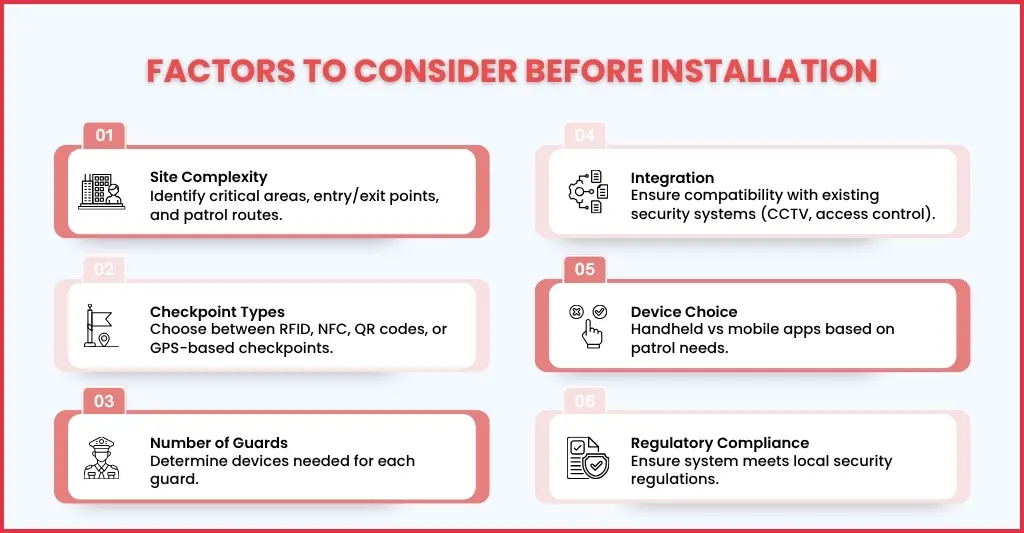
Before guard tour system installation, consider the following:
- Site Complexity: Start by fixing on the number of checkpoints you want, entry/exit points, and areas you want the system to cover.
- Type of Checkpoints: Depending on the security threats and future requirements, decide on the type of checkpoints you want, which can be QR codes, RFID, NFC or Virtual Checkpoints.
- Number of Guards: Make a list of guards you are going to deploy so that arrangements can be made for devices required for scanning and incident reporting purposes.
- Integration Requirements: Select a guard tour system that easily syncs with your existing security management or reporting systems.
- Mobile vs Fixed Devices: Study your guard’s requirements and security risk factors during patrols and decide whether to provide handheld devices or mobile-based app systems.
- Regulatory Compliance: Ensure the guard tour system you select aligns with UK security regulations and client contractual requirements
Step-by-Step Guide to Installing a Guard Tour System
Here’s how to approach installation systematically:
Step 1: Access Security Objectives and Building Layout
Before installing the system, know your client’s security needs. For that, you will need to identify:
- High-risk areas that include entry/exit points, server rooms, fire escapes, stairwells, and parking lots.
- Fix security goals like preventing unauthorised access, ensuring safety compliance, or protecting assets.
- Knowing the number of guards needed and their shift structures.
Access to them is important in order to create an efficient patrol route that maximises visibility and reduces response time.
Step 2: Choose the Right Guard Tour System
Zero down on the right guard tour system that will meet your client’s security requirements. There are two main types of guard tour systems:
Offline Guard Tour Systems
- Such systems use handheld readers
- Data is uploaded manually through a USB or a docking station
- Ideal for small-to-medium-sized buildings with limited connectivity
Online Guard Tour Systems
- Features mobile apps, RFID/NFC readers, or cloud-connected devices
- Offer real-time monitoring, alerts, and dashboard analytics
- Ideal for large enterprise facilities or manufacturing sites that need immediate oversight
See to it that the system you select includes essential components: rugged handheld readers, tamper-proof checkpoint tags, intuitive management software, and user training guides.
Step 3: Install Checkpoints at Key Patrol Locations
Install digital tags (RFID, NFC or QR) on checkpoints across critical areas throughout the premises where your guards will be deployed for security.
Make sure to install the tags:
- At an accessible height
- Use screws or adhesives that cannot be tampered easily.
- Don’t install the tags in areas that are prone to electromagnetic interference
- All tags must be uniquely identified in your software system
Selecting the right placement is important because it guarantees that patrols pass through critical locations, not just high-traffic zones.
Step 4: Set Patrol Routes in the Software
The mind of the guard tour system is its software. Therefore, make sure to add:
- User profiles for each of your guards
- Input checkpoint IDs and map their locations
- Create patrol schedules (e.g., 4 rounds per shift)
- Set thresholds for delays, missed scans, or route violations
- Enable alerts for exceptions (e.g., guard missed a checkpoint or took too long)
Modern systems like QR-Patrol offer advanced options like mobile notifications and GPS tagging.
Step 5: Give Training to Your Guards on Equipment and Protocol
Getting the most advanced guard tour system is useless without providing your guards with proper training. Therefore, start familiarising your guards with:
- How to operate the scanning device or mobile app
- Proper scanning technique and patrol custom
- Steps to follow in case of damaged tags or device failure
- How to log incidents or unusual activity via the system
Focus on simulated training scenarios to prepare your guards for emergencies and system errors.
Step 6: Conduct a Test Patrol
Before deploying it in the field, run a full test of the system. Such tests are critical in ensuring:
- All checkpoints scan correctly
- Time logs are accurate
- Ensuring device battery life and connectivity are working fine
- Identify and address bottlenecks or delays
Such trials help in fine-tuning the patrol process and reducing operational surprises.
Step 7: Launch Full Deployment
When the test run is a success, deploy the guard tour system for daily operations.
- Give each guard their reader or app access
- Ensure your supervisors monitor patrol reports daily
- Address missed patrols or route errors promptly
- Add or remove checkpoints based on the premise layout changes
Make a point to conduct system performance reviews on a monthly basis.
Step 8: Examine Reports for Performance and Compliance
Guard tour systems provide valuable data that can be used for:
- Tracking individual guard performance
- Verifying patrol completion
- Ensuring compliance with safety regulations
- Detecting patterns (e.g., frequent delays at specific locations)
These data must be used for making staff decisions, fine-tuning patrol routes, and updating training processes.
Step 9: Integrate with Other Security Systems
You can further boost your existing security system by integrating a guard tour system with:
- CCTV systems: To verify guard presence with video
- Access control: To track door entries
- Fire alarms: To include emergency response protocols in patrols
Such integration provides all-around security to the premises.
Step 10: Maintain and Update the System Regularly
For long-term performance, keep updating the system. This can be done by:
- Checking hardware monthly for wear or damage
- Updating the software to patch bugs or add features
- Onboarding new staff quickly and effectively
Conduct annual reviews to ensure the patrol strategy still fits the current layout
Common Mistakes to Avoid When Installing a Guard Tour System
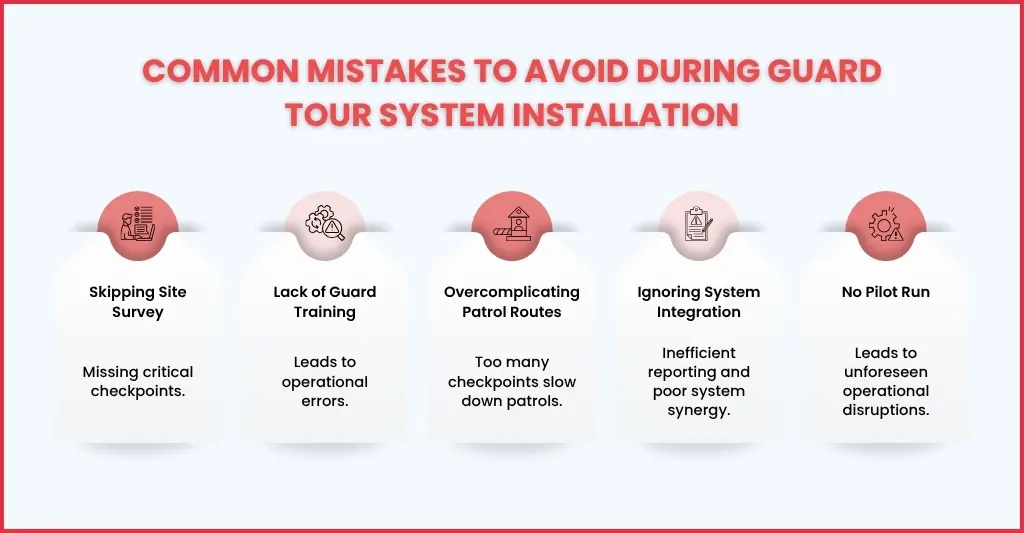
Of course, during the installation of the guard tour system, mistakes take place, and some of them are common. These mistakes are:
- Not Doing Site Survey: It will surely lead to missing out on checkpoints and areas that need coverage, leading to security blind spots.
- Insufficient Training: When guards are not familiarised and trained on the guard tour system, it will lead to a lack of awareness of correct procedures and errors
- Overcomplicating Routes: Too many checkpoints will slow down patrols and increase the incident response time.
- Ignoring Integration Needs: Lack of integration of existing security systems with guard of tour systems will create reporting inefficiencies
- No Pilot Run: Avoiding proper testing will lead to operational disruptions, creating security issues and loss of trust of your clients
Avoiding these mistakes ensures the system works as intended and improves adoption across your team.
Maintenance and Upgrades: Keeping Your Guard Tour System in Top Shape
Your job does not end by installing the guard tour system; it requires continuous maintenance to do its job well. Hence, ensure the following:
- Hardware Checks: Such checks identify and replace damaged tags or handheld devices
- Software Updates: Keep apps and dashboards updated to the latest version to remove bugs, include safeguards, and ensure compatibility with the latest compliance requirements.
- Route Review: Adjust patrols based on operational changes or new client requirements
- Training Refresh: Conduct retraining of staff at regular intervals on new features or changes
FAQs: Frequently Asked Questions
How long does a guard tour system installation take?
The time taken for guard tour system installation really depends on the number of checkpoints and sites it’s going to be deployed at. Ideally, it will take 1 to 3 weeks, and it includes the time taken for configuration and staff training
What is the purpose of the guard tour system?
A guard tour system is a technology solution that keeps track of and manages the patrol routes of security guards. This technology replaces manual logbooks and provides real-time visibility and automated reporting.
What types of checkpoints can be used?
Some of the common types of checkpoints used by security firms are QR codes, RFID tags, NFC tags, and GPS-based virtual checkpoints. The selection of these checkpoints is based on the level of security your client needs.
Can a guard tour system integrate with existing security software?
Yes. Most modern systems, including QR-Patrol, offer integration with security management dashboards, incident reporting, and client reporting platforms.
Is training required for guards?
Yes, proper training is required so that your guards are familiar with the checkpoints, how to scan them, and the usage of hand-held devices or apps to maintain compliance.
How does a guard tour system improve compliance?
The QR-Patrol system offers audit trails, real-time alerts, and reports, helping you in meeting your client’s requirements and meeting the security regulations of BSIA.
Conclusion
Guard Tour Systems are slowly but surely becoming a necessity for security firms to do their jobs with perfection. When the guard tour system installation is done properly, it will ensure:
- Accurate real-time monitoring of all patrols
- Compliance with client and regulatory standards
- Reduced operational errors and missed check-ins
- Faster incident response and reporting
QR-Patrol will ensure that, and through you, you will gain the added benefit of:
- Expert support during installation
- Seamless integration across sites
- Scalable systems for multiple locations
- Ongoing maintenance and software upgrades
Investing in the right guard tour system and installing it correctly protects your clients, empowers your security staff, and gives your firm a competitive edge in the UK security market. Are you ready to enhance your security services? Use our contact form, share your requirements and see how we transform your services.