Mobile forms are digital forms used by security guards to record patrol activities, incidents, inspections, visitor logs, and compliance checks using a mobile device in real-time. Instead of paper forms, the mobile forms have allowed security firms to capture accurate data in real-time, and that is instantly available.
In today’s fast-changing security environment, the shift from paper to mobile forms means a lot.
Picture this.
A guard just finished their night patrol at a commercial site and suddenly notices:
- A damaged gate lock,
- Poor lighting near the loading area,
- And suspicious activity near the rear entrance
These details were written down by the guard on a paper form at the end of the shift. The written details were unclear, and the report did not reach the management until the morning.
By then:
- The issue remained unresolved
- The client hasn’t been informed
- And there was no real-time visibility into what happened overnight
Mobile forms eliminate these deficiencies by allowing guards to log instantly:
- Photos
- Timestamps
- GPS location
- Incident notes
- And escalation alerts directly from a smartphone
Today, security firms across the UK are under increasing pressure to deliver on:
- Accountability
- Faster reporting
- Stronger compliance
- And measurable service quality
Sadly, the old paper-based systems are not able to fulfil these. That’s why platforms like QR-Patrol are helping security firms modernise operations using Mobile Forms, real-time reporting, and digital patrol management.
In this guide, we’ll explain:
- Why paper forms are holding security firms back
- How mobile forms work
- Their key benefits
- And how QR-Patrol PRO enhances operational efficiency for modern security teams
The Limitations of Paper Forms in Security
For decades, the majority of security firms relied heavily on:
- Notebooks
- Printed checklists
- Handwritten incident logs
- And manual patrol records
They are easy to use, but sadly not useful in today’s modern security environment. Let’s understand their limitations in detail.
Delayed Reporting
Paper forms cannot be reviewed instantly. This means:
- Incidents may not be escalated quickly
- Supervisors lack real-time visibility
- And urgent risks can go unnoticed for hours
In a fast-changing security scenario, delays can increase:
- Safety risks
- Liability exposure
- And client dissatisfaction
Human Errors & Incomplete Records
Handwritten reporting is always prone to:
- Missing details
- Illegible writing
- Inaccurate timestamps
- Forgotten observations
- Manipulations
During investigations or audits, incomplete reports will cause serious problems for your clients and harm the reputation of your security firm.
No Real-Time Accountability
Paper systems cannot:
- Allow your supervisors to monitor activity live
- Your clients cannot verify patrol completion in real-time
- And there is limited operational transparency
In today’s security environment, your clients will demand proof, not your assumptions.
Difficult Record Management
Managing paper documents as its share of challenges, such as:
- Storage challenges
- Retrieval delays
- Lost records
- And inefficient audits
Getting the right report that was generated months ago will become a time-consuming process.
Limited Data Insights
Paper records are unable to provide:
- Analytics
- Trend tracking
- Patrol performance insights
- Or operational visibility
These are the foundations of modern security management, and without them, data-driven decision-making cannot be made.
What Are QR-Patrol’s Mobile Forms?
QR-Patrols mobile forms are highly customisable digital forms that can be accessed only through a QR-Patrol PRO tier subscription. These forms are designed for security guards on patrols and allow your guards and supervisors to:
- Make their reports on mobile devices
- Send instructions to guards
- Capture incidents instantly
- Submit real-time updates
- Attach images and evidence
- And maintain digital audit trails
Instead of carrying clipboards or manually filling paperwork after shifts, guards can complete structured forms directly during patrols.
Rather than hamstringing your guards with clipboards and papers that require their hands to be free to tackle an emergency situation, you must arm them with our digital devices. Every time the device is scanned by your guards at a checkpoint, the form will appear in order to be filled out by your guards.
QR-Patrol forms can be customised to fulfil multiple requirements, such as:
- Incident reporting
- Health & safety inspections
- Maintenance checks
- Visitor logs
- Access control verification
- Compliance audits
- Patrol checklists
- And site inspections
What are the Key Features of Mobile Forms?
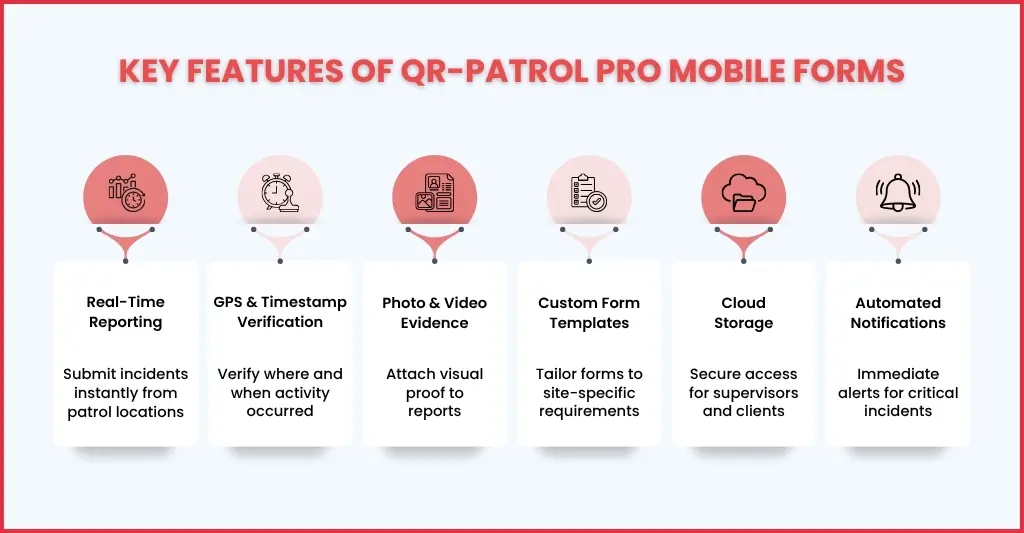
Mobile forms have not been invented to be a simple digital checklist. It has more to offer in the form of features that can enable your security firm to perform modern security operations. These features are:
Real-Time Reporting
Your guards will be able to send reports to their superiors in real-time from the incident locations, providing them visibility into:
- Incidents
- Patrol exceptions
- Maintenance concerns
- And security breaches
GPS & Timestamp Verification
Each incident reporting submission made will have:
- Exact time
- Location data
- User identification
This creates stronger accountability and operational proof.
Photo & Media Attachments
Mobile forms will also enable your guards to upload:
- Photos
- Videos
- Supporting evidence
This improves incident accuracy and can be forwarded to law enforcement and insurance companies for evidence and claim purposes.
Customisable Form Templates
As a security firm, your guards will be providing security to all kinds of businesses. That’s why mobile forms have been designed to handle:
- Different sites
- Industries
- Patrol types
- Compliance requirements
Cloud-Based Storage
All reports will be stored securely online, making them highly accessible to supervisors and your clients.
Cloud-based storage will keep your security firm:
- Audit ready
- Compliant
- Enable long-term record retention
Automated Notifications
When a critical incident takes place, the form will trigger an instant alert to:
- Supervisors
- Managers
- Clients
- Or emergency contacts
Such fast visibility will lead to faster response times.
Benefits of Using Mobile Forms for Security Teams
The shift from paper forms to digital mobile forms will bring in multiple benefits to your clients and your firm and improve the entire security environment.
Faster Incident Response
Mobile forms will enable your guards to perform mobile submissions to their supervisors in real-time, to act immediately.
Rather than waiting till the end of the shift, your guards will now be able:
- Ensure issues are escalated instantly
- Actions are taken faster
- And risks are reduced
Improved Accuracy
Mobile forms are in digital format, which means a reduction in issues that plague paper forms, like:
- Forgotten details
- Handwriting problems
- Incomplete documentation
A structured mobile form will ensure consistency across the board.
Better Accountability
Each and every action and incident recorded in the form will be traceable through:
- Timestamps
- GPS verification
- User activity logs
Such transparency will generate more confidence among your clients with regard to your security services.
Stronger Compliance
Regulatory authorities like the Security Industry Authority and clients are increasingly demanding compliance from security firms, which includes:
- Audit-ready records
- Digital reporting
- Proof of patrol completion
Mobile Forms will fulfil that by simplifying:
- Compliance reviews
- Insurance documentation
- Internal audits
Operational Efficiency
Mobile incident reporting reduces the time taken in:
- Paperwork
- Administrative work
- Manual data entry
Even your supervisors will have to spend less time running for reports and will spend more time managing operations from their control rooms.
Better Client Reporting
Through mobile forms, your client will be able to get:
- Accurate reports
- Visual evidence of incidents
- Professional documentation
- Quick communication
This strengthens trust and retention.
It must be said that mobile forms don’t just digitise paperwork; they improve the entire security workflow.
Use Cases: How Security Teams Leverage Mobile Forms
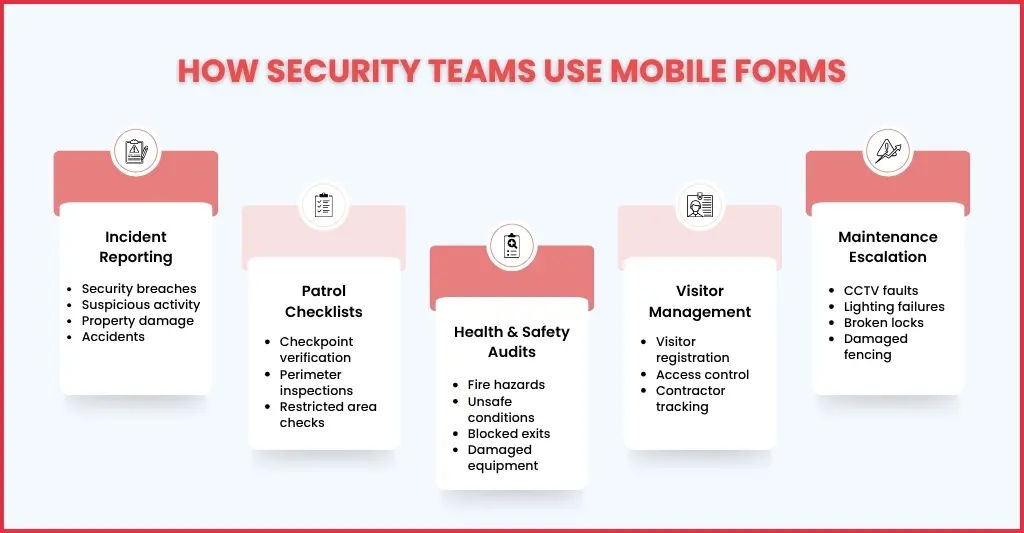
Mobile forms are quite flexible in their usage, which is why security firms are using them across many operational areas.
Incident Reporting
Using mobile forms, your guard can document in real-time:
- Suspicious activity
- Accidents
- Security breaches
- Property damage
These documented incidents can be submitted instantly with supporting evidence.
Patrol Checklists
Mobile forms enable your guards on patrol to verify:
- Completions checkpoints
- Inspection of restricted areas
- Perimeter checks
Health & Safety Inspections
Mobile forms can be used by your security teams to report:
- Fire hazards
- Damaged equipment
- Blocked exits
- Unsafe conditions
Visitor & Contractor Logs
Using mobile forms, your guards can streamline:
- Visitor registration
- Access tracking
- Compliance documentation
Maintenance Escalation
During patrol duty, your guards will surely come across multiple equipment failures which must be reported instantly, like:
- Faulty CCTV
- Lighting failures
- Broken locks
- Damaged fencing
This reduces delays between detection and resolution.
Compliance Audits
Digital records simplify:
- Client audits
- Regulatory reviews
- Insurance investigations
It ensures everything becomes searchable, trackable, and verifiable.
Transitioning from Paper to Digital: Best Practices
Transitioning from paper forms to mobile forms is more than just installing software. To make it work successfully, you will need to implement it properly, and that requires planning.
Standardise Reporting Procedures
Firstly, customise your mobile form as per the reporting procedures you and your client require, like:
- Reporting expectations
- Incident categories
- Escalation protocols
- Required evidence standards
Consistently following such reporting procedures will improve your reporting quality.
Train Security Teams Properly
Your security guard might resist the adoption of mobile forms due to:
- Fear new technology
- Lack of training
- Or not understanding system benefits
By giving training and familiarising your guards with mobile forms, you will increase their confidence and ensure full compliance.
Start with High-Impact Processes
Start with digitising important documents that are paramount to safety, like:
- Incident reports
- Patrol logs
- Inspection checklists
This will deliver immediate operational value to your clients.
Use Simple Mobile Interfaces
Not so easy to understand forms will reduce their ease of use among guards. That’s why get or tailor a mobile form that is:
- Intuitive
- Fast
- And easy to complete under pressure
Monitor Adoption & Reporting Quality
Getting the mobile form is one thing, and making sure it is adopted and working well is a completely different ball game. To ensure that you will need to make sure your managers are conducting regular reviews on:
- Report completion rates
- Response times
- Reporting accuracy
Why QR-Patrol PRO Stands Out
Many digital reporting systems focus on basic form submission, but not QR-Patrols PRO mobile forms.
Whether it is:
- Giving more detailed checkpoint instructions to your guards?
- Wanting your guards to answer a series of questions after they perform an action?
- To enable them to write even more detailed reports to send to the Monitoring Centre?
- To keep all checkpoint-related information organised and in one place?
QR-Patrol PRO mobile forms will help you in achieving that. Modern security firms are no longer judged only by guard presence.
They are judged by:
- Visibility
- Reporting quality
- Accountability
- Operational proof
QR-Patrol PRO mobile forms fulfil that.
FAQs: Frequently Asked Questions
What are mobile forms in security operations?
Mobile forms are digital reporting tools that allow security guards to record incidents, patrol activities, inspections, visitor logs, and compliance checks directly from their smartphones or mobile devices in real time.
How do mobile forms improve security reporting?
Mobile forms enable instant reporting with GPS location, timestamps, photos, and digital audit trails. This improves accuracy, speeds up incident response, and provides supervisors with real-time visibility into field operations.
Can QR-Patrol Mobile Forms be customised for different security sites?
Yes. QR-Patrol Mobile Forms can be tailored to specific site requirements, including incident reporting, patrol checklists, health and safety inspections, visitor management, maintenance reporting, and compliance audits.
How do mobile forms help security companies maintain compliance?
Mobile forms create secure, time-stamped, and searchable digital records that support regulatory compliance, client audits, insurance investigations, and proof of patrol completion.
Why should security firms switch from paper forms to QR-Patrol Mobile Forms?
Unlike paper-based systems, QR-Patrol Mobile Forms provide real-time reporting, improved accountability, faster communication, cloud-based record storage, and better operational visibility, helping security firms deliver a more professional and transparent service.
Conclusion
The UK security environment is changing, and with that, UK security firms have to change to tackle modern-day challenges. Right now, clients are demanding:
- Real-time visibility
- Professional reporting
- Operational accountability
- And measurable service quality
Clearly, paper-based reporting systems cannot meet those expectations effectively. But mobile forms can meet them by transforming reporting into a faster, smarter, and more transparent process.
That’s why many UK security companies are now adopting digital patrol and incident reporting solutions like QR-Patrol to improve accountability, streamline operations, and deliver better client confidence.
Wanting to transition your security firm towards modernity? Seek our services by contacting us and see the transformation yourself.